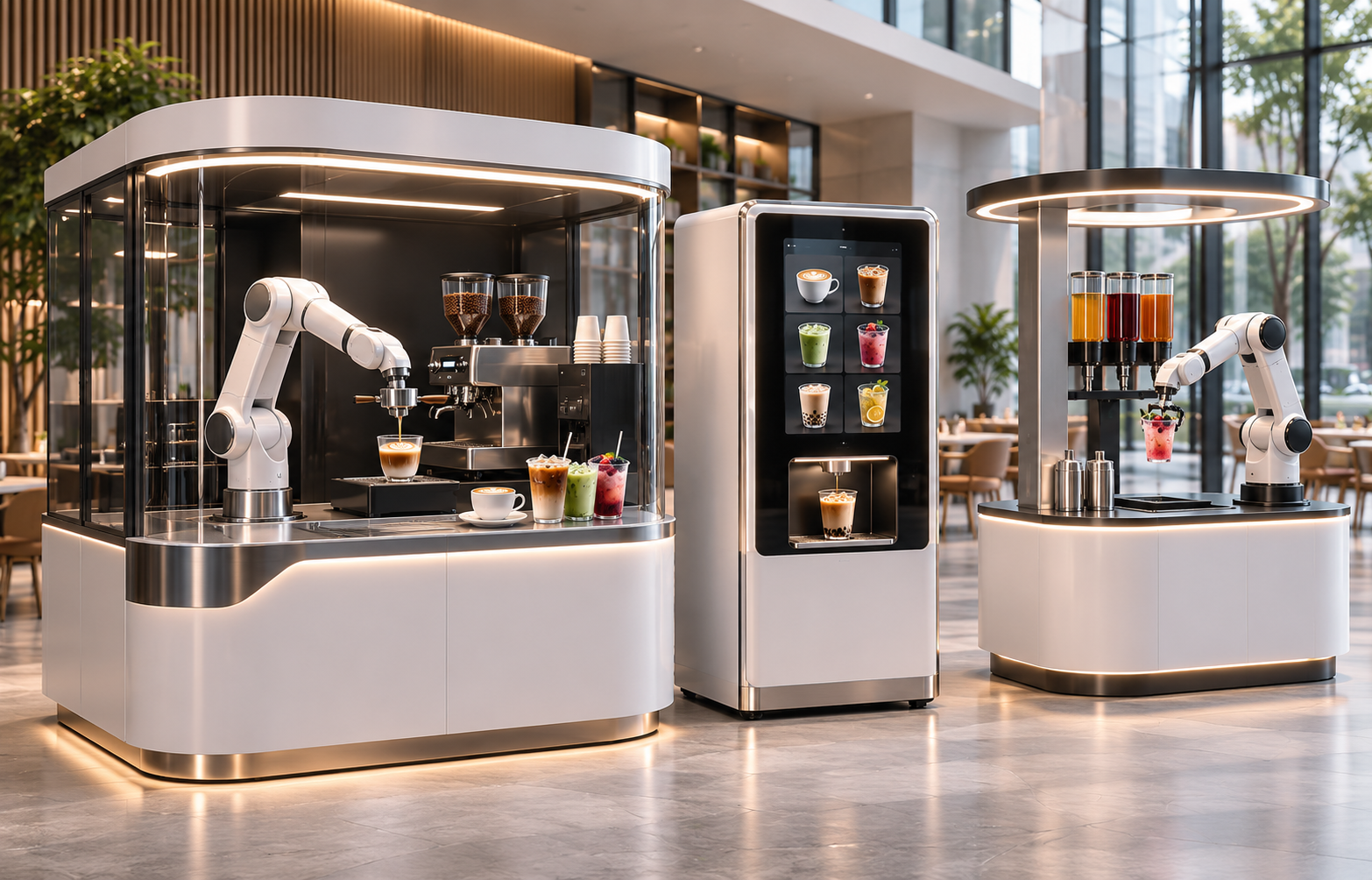
 TheEveBot | Robotic Solutions & Commercial Equipment
Artificial intelligence, robotics, and smart vending technology are transforming how businesses serve food and beverages. From automated coffee kiosks to robotic beverage stations, a new generation of self-service machines is creating opportunities for commercial retail, hospitality, transportation, and entertainment venues.
Unlike traditional vending machines, advanced robotic systems can combine automated preparation, digital payments, remote monitoring, and interactive customer experiences in a single installation.
An AI robotic vending machine is an automated retail system that can prepare or dispense products with minimal staff involvement, using robotics, sensors, software, and, in some configurations, AI-powered decision-making.
For business owners and commercial buyers, the important question is not simply whether robotic vending technology looks impressive. It is whether the equipment can deliver consistent service, reliable operation, and sustainable commercial value.
This guide explains the technology, applications, benefits, costs, and purchasing considerations for AI robotic vending machines in 2026.
What Is an AI Robotic Vending Machine?
An AI robotic vending machine is a self-service retail system that uses automated mechanisms and digital technology to deliver products or freshly prepared beverages.
Depending on the configuration, these systems may include:
- Robotic arms for beverage preparation and product handling
- Touchscreen ordering interfaces
- Cashless and contactless payment systems
- Automated coffee brewing or beverage mixing
- Inventory monitoring and remote diagnostics
- Cameras and sensors for operational monitoring
- AI-assisted analytics or maintenance alerts
Importantly, not every automated vending machine uses artificial intelligence.
A basic vending machine may rely entirely on predefined mechanical sequences. An AI-enabled system may use additional software to analyze operating patterns, recognize certain conditions, or assist with forecasting and support.
Buyers should ask suppliers to demonstrate precisely which capabilities are AI-powered.
How Do Robotic Vending Machines Work?
A typical automated beverage vending process involves six stages.
Step 1: Customer Places an Order
Customers choose products or beverages through a touchscreen, mobile interface, or another supported ordering system.
Menu customization may include beverage size, flavor, sweetness, temperature, and additional ingredients.
Step 2: Digital Payment
The system processes payment through its supported payment gateway.
Payment options vary by model, destination country, and payment provider.
Step 3: Automated Preparation
The machine receives the order and activates its preparation equipment.
A robotic coffee kiosk may grind coffee beans, brew espresso, dispense milk, and move cups using automated mechanisms.
Other systems may prepare tea, flavored beverages, or mixed drinks.
Step 4: Robotic Handling
Where a robotic arm is installed, it can transfer cups or perform selected preparation and presentation tasks.
This feature may create an engaging visual experience for customers in busy commercial locations.
Step 5: Product Collection
After preparation, the machine delivers the finished beverage to a designated collection area.
Appropriate guarding, sensors, and access controls help separate customers from moving machinery.
Step 6: Remote Monitoring and Maintenance
Connected systems may report sales activity, ingredient levels, machine faults, and operational status to a management dashboard.
However, remote monitoring does not eliminate the need for physical cleaning, restocking, or equipment servicing.
Main Types of Robotic Vending Machines
1. AI Robotic Coffee Kiosks
Robotic coffee kiosks are designed to automate parts or all of the coffee preparation and serving process.
Depending on the system, they may support:
- Espresso
- Americano
- Cappuccino
- Latte
- Flavored coffee beverages
- Hot and cold coffee options
Some robotic coffee systems feature visible robotic arms, creating a distinctive customer experience.
Best for: Shopping malls, airports, office buildings, universities, hotels, and other high-traffic locations.
2. Automated Coffee Vending Machines
Automated coffee vending machines typically use integrated brewing and dispensing mechanisms without a visible robotic arm.
They may offer a compact footprint and a more conventional customer experience.
Best for: Offices, hospitals, schools, transportation facilities, and self-service retail locations.
3. Robotic Beverage Vending Systems
Automated beverage systems can be configured for selected drink categories such as milk tea, flavored beverages, or specialty refreshment products.
Ingredient compatibility, refrigeration, recipes, and preparation capabilities depend on the machine design.
Best for: Shopping centers, entertainment venues, beverage chains, and commercial franchise operations.
4. Robotic Food and Dessert Vending Machines
Some robotic retail systems automate the preparation or dispensing of desserts, snacks, frozen products, and other food items.
Because food handling requirements vary significantly, commercial buyers should verify the exact food categories supported by the equipment.
Best for: Entertainment centers, transport hubs, food courts, and hospitality venues.
Robotic Coffee Kiosk vs. Traditional Vending Machine
| Feature | Robotic Coffee Kiosk | Traditional Vending Machine |
|---|---|---|
| Core function | Fresh beverage preparation | Dispensing stored products |
| Robotic arm | Available on selected models | Usually not included |
| Customer interaction | Touchscreen and optional robotic demonstration | Standard selection interface |
| Customization | Model-dependent drink customization | Often more limited |
| Maintenance | Cleaning, restocking, technical servicing | Restocking and equipment servicing |
| Installation | May require additional utilities and space | Depends on product type |
| Ideal use | Premium beverage retail | Convenience-oriented retail |
Neither solution is universally better.
Businesses should select equipment based on customer demand, location, maintenance capabilities, investment budget, and desired service experience.
Seven Benefits of AI Robotic Vending Machines
1. Extended Service Hours
Automated systems can help businesses serve customers outside conventional staffing hours.
However, actual operating availability depends on site access, cleaning schedules, ingredient replenishment, and equipment reliability.
2. More Consistent Preparation
Automation can standardize selected preparation steps and reduce variation between beverage servings.
Recipe consistency still depends on ingredient quality, machine calibration, maintenance, and correct operating procedures.
3. Reduced Routine Labor Requirements
A robotic system may reduce the amount of staff time required for taking orders and preparing individual drinks.
Staff or service partners are still needed for replenishment, cleaning, technical maintenance, customer support, and operational management.
4. Customer Engagement
Visible robotic arms, automated preparation, and interactive interfaces can make the purchasing experience more memorable.
This may be particularly valuable in shopping malls, exhibitions, tourist destinations, and branded retail environments.
5. Remote Business Management
Connected systems can help operators review sales data, monitor ingredient consumption, and receive equipment notifications.
Actual software functionality should be confirmed before purchase.
6. Flexible Commercial Deployment
Robotic vending solutions may be suitable for locations where a conventional staffed café is impractical.
Installation requirements vary by machine size, utility connections, electrical capacity, and local regulations.
7. Opportunities for Business Expansion
Automated retail may enable businesses to test new locations or develop additional sales channels.
The commercial outcome depends on demand, installation costs, product margins, maintenance expenses, and other factors.
Where Can AI Robotic Vending Machines Be Installed?
Shopping Malls and Retail Centers
Automated coffee or beverage kiosks can provide convenient refreshments while creating an interactive attraction for shoppers.
Airports and Transportation Hubs
Self-service beverage equipment may support travelers during early mornings, late evenings, and other periods when conventional food service is limited.
Hotels and Hospitality Properties
Robotic coffee stations may complement lobby cafés, business lounges, and other guest-service areas.
Corporate Offices
Automated beverage systems can provide staff and visitors with access to refreshments without requiring a dedicated barista at every location.
Universities and Hospitals
These locations may benefit from extended service hours, although accessibility, cleaning, ingredient management, and site approval remain important.
Exhibitions and Entertainment Venues
Robotic beverage preparation may become part of an interactive brand activation or event experience.
How Much Does an AI Robotic Vending Machine Cost?
The price of a robotic vending machine varies significantly depending on the level of automation, robotic hardware, beverage capabilities, software, and installation requirements.
A basic automated beverage vending machine and a fully enclosed robotic coffee kiosk are different equipment categories and should not be compared on purchase price alone.
Commercial buyers should request a detailed quotation covering:
- Equipment purchase price
- Robotic arm and automation configuration
- Payment integration
- Software licensing or service fees
- International freight and import expenses
- Installation and commissioning
- Cleaning supplies and consumables
- Spare parts and maintenance
- Warranty and technical support
The total cost of ownership is usually more useful than the initial quoted equipment price.
Are Robotic Coffee Kiosks Profitable?
Robotic coffee kiosks can generate revenue, but profitability is not guaranteed.
An illustrative calculation can help buyers understand the variables involved.
Suppose a commercial coffee kiosk sells 80 drinks per day at an average selling price of $4.
- Daily gross revenue: $320
- Monthly gross revenue at 30 operating days: $9,600
This is only a hypothetical revenue scenario.
It excludes coffee beans, milk, cups, payment fees, cleaning, rent, utilities, labor, repairs, software, depreciation, taxes, and equipment financing.
A responsible feasibility study should use actual location traffic, realistic conversion rates, product margins, downtime assumptions, and confirmed operating costs.
What Should Buyers Check Before Purchasing?
Beverage Quality
Request video demonstrations and, where possible, sample testing using the intended recipes.
Production Capacity
Ask for measured drinks-per-hour capacity under realistic menu and operating conditions.
Cleaning and Food Safety
Confirm cleaning procedures, milk refrigeration, food-contact materials, ingredient storage, wastewater handling, and applicable regulatory documentation.
Installation Requirements
Check machine dimensions, power supply, water supply, drainage, ventilation, accessibility, and floor loading.
Payment Compatibility
Confirm that payment methods and transaction processing are supported in the destination market.
Remote Management
Ask whether the machine includes inventory alerts, sales reporting, fault notifications, remote diagnostics, and software update capabilities.
Warranty and After-Sales Support
Request written information on warranty coverage, service availability, spare parts, training, and fault-response procedures.
Frequently Asked Questions
What is an AI robotic vending machine?
An AI robotic vending machine is an automated retail system that uses robotics and software to prepare or dispense products. Some configurations also use AI-assisted monitoring, analytics, or decision-making.
Can robotic coffee kiosks operate 24 hours a day?
Some systems are designed for extended or around-the-clock operation. Actual availability depends on site permissions, maintenance, cleaning, ingredient replenishment, and equipment reliability.
Do robotic vending machines need employees?
They may reduce certain routine service tasks, but people are still required for cleaning, refilling supplies, servicing equipment, and handling customer issues.
What is the difference between a coffee robot and a coffee vending machine?
A coffee robot generally refers to equipment using robotic mechanisms, sometimes including a visible robotic arm. A coffee vending machine usually relies on automated internal dispensing and preparation systems.
Can an AI robotic coffee kiosk make cappuccino and latte?
Many robotic coffee systems support espresso-based drinks, but the available recipes depend on the configuration. Always verify the exact menu with the supplier.
What is the best location for a robotic coffee vending machine?
Locations with consistent beverage demand, suitable utilities, accessible service support, and manageable operating costs may be attractive. A site feasibility assessment is essential.
Can robotic vending machines accept credit cards?
Many commercial systems support digital payments, but credit card and contactless compatibility depend on the hardware, software, payment provider, and destination country.
How do I choose a robotic vending machine supplier?
Compare product demonstrations, manufacturing specifications, supported configurations, documentation, service arrangements, warranty terms, and total operating costs before ordering.
Explore Robotic Coffee and Beverage Solutions at TheEveBot
At TheEveBot, we focus on coffee equipment, beverage processing technology, food printing equipment, and robotic retail solutions for international customers.
Our platform is designed to support both individual equipment purchases and commercial procurement enquiries.
Whether you are evaluating a compact automated coffee station or a larger robotic beverage project, choosing the right solution requires careful consideration of your location, expected demand, drink menu, and available budget.
Contact TheEveBot for Robotic Vending Solutions
Tell us about your project:
- Destination country
- Intended installation location
- Preferred beverage menu
- Expected daily sales volume
- Available installation space
- Estimated equipment budget
Our team can help you explore suitable equipment options and available configurations.
Website: https://theevebot.com/
Email: sales@theevebot.com
Phone / WhatsApp: +86 15947818999
TheEveBot — Coffee, Beverage & Robotic Retail Equipment for Modern Businesses.
Disclaimer: Equipment features, certifications, prices, and configurations vary by supplier and model. Request current technical documentation and verify local requirements before purchase.
Published by TheEveBot | Coffee & Food Equipment Buying Guides
Coffee printers are changing how cafés, restaurants, hotels, and event businesses personalize beverages. From custom company logos to full-color customer photographs, a coffee printer can turn an ordinary cup into a memorable visual experience.
But which coffee printer is right for your business?
The best coffee printer depends on three key factors: printing speed, color requirements, and the type of customer experience you want to create. A high-volume café may prioritize fast single-color logo printing, while an event business may benefit more from full-color photographs and personalized designs.
In this guide, we explain how coffee printers work, compare different models, and highlight the features that matter before purchasing.
What Is a Coffee Printer?
A coffee printer is a specialized food printing machine that uses compatible edible ink to apply images, logos, text, or decorative designs to suitable beverage surfaces.
Unlike traditional latte art, which requires a barista to pour patterns using steamed milk, a coffee printer digitally reproduces an uploaded design.
Coffee printers are commonly used for:
- Personalized latte art and cappuccino designs
- Company logos on coffee foam
- Wedding and birthday messages
- Branded beverages at exhibitions
- Hotel welcome drinks
- Promotional events and product launches
Certain models can also print on compatible dessert surfaces, depending on the printing technology and accessories.
How Does a Coffee Printer Work?
Most modern coffee printers follow a simple process:
- Prepare a coffee or beverage with a smooth, stable foam surface.
- Upload a digital image, company logo, or text.
- Position the cup correctly beneath the printer.
- Preview the design and start printing.
- Serve the personalized beverage.
The printer uses edible ink rather than conventional printing ink. The surface quality, printing distance, and design coverage influence the final appearance.
Important: Always use ink cartridges approved for the specific printer and verify that the ink meets applicable food-safety requirements in your market.
Types of Coffee and Food Printers
1. Single-Color Coffee Printers
Single-color coffee printers produce designs using one edible ink color, commonly coffee brown.
They are particularly suitable for businesses that want to print logos, short messages, or decorative patterns without requiring full-color photographs.
An example is the EVEBOT EB-PRO Coffee Printer.
Key specifications include:
- Printing resolution: 600 DPI
- Printing speed: approximately 5–15 seconds per cup
- Ink color: coffee brown
- Typical cartridge yield: approximately 800–1,000 prints, depending on coverage
Best for: Busy cafés, restaurants, hotels, and businesses that frequently print simple logos or text.
2. Full-Color Coffee Printers
Full-color printers are designed for more detailed visual experiences, including colorful brand logos, photographs, and personalized graphics.
The EVEBOT EB-FC1 Full Color Coffee Printer offers:
- 600 DPI printing resolution
- Multicolor edible ink printing
- Approximately 20–40 seconds per print
- Smartphone image-upload capability
- An optional selfie camera configuration
Full-color printing is especially attractive for events where personalization is part of the customer experience.
Best for: Weddings, luxury hotels, promotional campaigns, photo experiences, and specialty coffee businesses.
3. Handheld Food Printers
A handheld food printer provides greater flexibility for printing on suitable food surfaces that may not fit beneath a desktop machine.
The EVEBOT Smart Handheld Food Printer is an example of a portable edible printing solution.
Handheld food printers may be useful for:
- Custom cookies and desserts
- Bakery decoration
- Branded food products
- Personalized edible messages
- Small food businesses
Best for: Bakeries, dessert shops, creative food businesses, and customers requiring portable printing capabilities.
Coffee Printer Comparison: Which Model Should You Choose?
| Feature | EB-PRO | EB-FC1 | Smart Handheld |
|---|---|---|---|
| Printer type | Desktop | Desktop | Handheld |
| Resolution | 600 DPI | 600 DPI | 300 DPI |
| Printing color | Single color | Full color | Cartridge-dependent |
| Main application | Coffee logos | Photos and logos | Food decoration |
| Priority | Fast printing | Color personalization | Portability |
| Typical users | Cafés and hotels | Events and premium venues | Bakeries and food creators |
The models serve different purposes. A faster single-color printer is not necessarily better than a full-color machine, and a handheld printer is not a direct replacement for a desktop coffee foam printer.
Five Factors to Consider Before Buying a Coffee Printer
1. Printing Speed
Printing speed matters when customers are waiting.
For example, a printer that takes 10 seconds per design has a theoretical printing-only capacity of six prints per minute. However, real-world output will be lower because cup positioning, image selection, preparation, and service take additional time.
When selecting a commercial coffee printer, evaluate the complete service workflow rather than the print cycle alone.
2. Print Quality and Resolution
Resolution is commonly expressed in DPI, or dots per inch.
A 600 DPI printer can offer detailed image reproduction, but actual results depend on image quality, edible ink characteristics, and foam stability.
For text and company logos, clear artwork and sufficient contrast are often more important than complicated graphics.
3. Edible Ink Compatibility
Always calculate the ongoing cost of consumables.
Check:
- Ink cartridge compatibility
- Expected prints per cartridge
- Replacement cartridge availability
- Storage and maintenance requirements
- Applicable food-safety documentation
Ink yield varies according to print dimensions, color coverage, and usage conditions.
4. Beverage and Surface Compatibility
Not every coffee printer works equally well on every beverage.
Stable, smooth foam generally provides a better printing surface than uneven or rapidly collapsing foam.
Before purchasing, confirm that the printer supports your intended drinks, cup dimensions, and decorative applications.
5. Business Requirements and After-Sales Support
For commercial buyers, reliable support matters as much as printing performance.
Check the product warranty, spare-parts availability, operating instructions, consumable supply, and support options.
International buyers should also verify destination-specific electrical requirements, import procedures, and edible ink regulations.
Is a Coffee Printer Worth It for a Café?
A coffee printer may be a worthwhile investment when personalized beverages support a clear business goal.
Potential benefits include:
Brand visibility: Printing a café logo or campaign message on a beverage creates a distinctive presentation.
Customer personalization: Names, messages, and artwork can make special occasions more memorable.
Event opportunities: Customized drinks can be incorporated into corporate events, hospitality experiences, and promotional packages.
Social sharing: Visually distinctive beverages may encourage customers to photograph and share their drinks.
However, a coffee printer does not automatically increase sales. The business case depends on customer demand, equipment cost, consumables, staff time, and how personalization is priced.
Simple Coffee Printer Return-on-Investment Example
Suppose a café sells 20 personalized drinks per day at an additional charge of $1.50 per drink.
The potential additional daily revenue is:
20 × $1.50 = $30
Over 30 operating days, that equals $900 in additional gross revenue.
This is an illustrative scenario, not a sales forecast. Actual profit must account for ink, labor, maintenance, transaction fees, equipment cost, and other operating expenses.
Coffee Printer vs. Traditional Latte Art
Traditional latte art and digital coffee printing are complementary rather than competing techniques.
Traditional latte art relies on barista skill, milk texture, and pouring technique. It is well suited to classic hearts, rosettas, and other artistic patterns.
Coffee printing allows businesses to reproduce digital artwork that would be difficult to create through pouring alone, such as company logos, photographs, or detailed messages.
For many cafés, combining excellent traditional coffee preparation with optional personalized printing can provide a more flexible customer experience.
Frequently Asked Questions About Coffee Printers
What is the best coffee printer for a small café?
A compact single-color coffee printer can be a practical choice when a small café mainly needs logos and short messages. Businesses offering photo-based personalization may prefer a full-color model.
Can coffee printers print photos on coffee?
Yes. Compatible full-color coffee printers can reproduce digital photographs on suitable coffee foam using edible ink. Image clarity depends on the printer, artwork, and foam surface.
How much does a coffee printer cost?
Pricing varies by brand, printing technology, accessories, supplier, and market. Compare the current equipment price together with consumables, shipping, maintenance, and support rather than evaluating the initial purchase price alone.
Do coffee printers use edible ink?
Food and beverage printers designed for direct edible decoration use compatible edible ink. Buyers should check ingredient documentation, approved applications, and local food regulations.
Can a coffee printer print on beer or cocktails?
Some models support suitable beer foam, cocktail foam, or other stable beverage surfaces. Compatibility should be confirmed for the specific printer and drink.
Are coffee printers difficult to operate?
Many modern models use touchscreen controls, wireless image uploads, or smartphone-based workflows. Operators still need basic training in cup positioning, foam preparation, and cartridge maintenance.
Can coffee printers be used at weddings and corporate events?
Yes. Personalized photos, names, messages, and business logos can make printed beverages useful for weddings, exhibitions, marketing campaigns, and special events.
Explore Coffee and Food Printing Equipment at TheEveBot
At TheEveBot, we help customers explore coffee printers, food printing technology, commercial coffee equipment, beverage processing machines, and business automation solutions.
Whether you are purchasing a coffee printer for personal creativity or evaluating equipment for a commercial project, the right choice starts with understanding your applications, budget, and operating requirements.
Explore our current equipment options:
- EVEBOT EB-PRO Coffee Printer
- EVEBOT EB-FC1 Full Color Coffee Printer
- EVEBOT Smart Handheld Food Printer
- Browse Coffee & Food Printers
Need help choosing the right coffee printer?
Contact TheEveBot for product information, equipment selection, and business purchase enquiries.
Email: sales@theevebot.com
Phone / WhatsApp: +86 15947818999
Website: https://theevebot.com/
Product specifications and availability may change. Confirm the selected configuration and applicable requirements before ordering.
Personalized coffee printing is becoming an attractive option for cafés, restaurants, hotels, and event businesses looking to offer memorable drinks and customized branding experiences.
Among commercial coffee printers, the EVEBOT EB-PRO and EB-FC1 are two options designed for different business needs.
Both machines can print photographs, logos, and customized designs on compatible coffee foam using edible ink. However, they differ significantly in printing speed, color capabilities, cartridge yield, and ideal applications.
So, which one should you buy?
This comprehensive comparison explores the features, advantages, limitations, operating costs, and practical applications of both machines to help you make an informed purchasing decision.
Quick Answer: EVEBOT EB-PRO vs EB-FC1
Choose the EVEBOT EB-PRO if printing speed and efficient monochrome logo printing are your priorities. Choose the EVEBOT EB-FC1 if colorful photographs, detailed brand graphics, and visually striking presentations are more important.
The EB-PRO supports approximately 5–15-second monochrome printing, making it suitable for busy cafés and high-volume service environments.
The EB-FC1 supports full-color printing in approximately 20–40 seconds, offering greater creative flexibility for hotels, weddings, corporate events, and promotional activities.
Both printers offer 600 DPI resolution and are designed for commercial beverage personalization.
1. EVEBOT EB-PRO vs EB-FC1: Complete Specifications Comparison
Before comparing applications, let’s examine the main specifications.
| Feature | EVEBOT EB-PRO | EVEBOT EB-FC1 |
|---|---|---|
| Printer type | Desktop coffee printer | Desktop coffee printer |
| Printing color | Monochrome brown | Full color |
| Resolution | 600 DPI | 600 DPI |
| Specified print speed | 5–15 seconds | 20–40 seconds |
| Cartridge yield | Approx. 800–1,000 prints | Approx. 600–800 prints |
| Supported cup height | 5–18 cm | 5–18 cm |
| Supported cup diameter | 4–10 cm | 4–10 cm |
| Image uploading | Wi-Fi / compatible upload interface | Wi-Fi / compatible upload interface |
| Built-in touchscreen | Yes | Yes |
| Selfie camera | Configuration-dependent | Configuration-dependent |
| Edible ink | Brown ink | Full-color ink |
| Best advantage | Printing speed | Color versatility |
| Recommended use | Busy cafés and routine branding | Hotels, events and colorful branding |
Specifications are manufacturer-published estimates. Actual printing times, cartridge yields, accessories, and results vary with image coverage, configuration, and operating conditions.
Although the machines share several technical characteristics, their different printing systems make them suitable for different commercial applications.
2. EVEBOT EB-PRO: Designed for Fast Coffee Printing
The EVEBOT EB-PRO Coffee Printer is a commercial coffee foam printer designed for businesses that prioritize printing speed and repeatable results.
Its key features include:
- High-speed printing in approximately 5–15 seconds
- 600 DPI printing resolution
- Single-color coffee-brown edible ink
- Wi-Fi image uploading
- Built-in touchscreen controls
- Estimated cartridge capacity of approximately 800–1,000 prints
Why Printing Speed Matters
Consider a café that offers personalized cappuccinos during busy morning hours.
When multiple customers order drinks with customized logos or messages, printing time becomes an important part of the service workflow.
A printer with shorter printing cycles may help staff complete personalized orders more efficiently.
For example, assume 60 customers require printed coffee designs.
At 15 seconds per print, the printing process alone takes approximately 15 minutes.
This does not include espresso preparation, milk steaming, image uploading, cup positioning, or serving.
The actual service time will depend on how the café organizes its workflow.
Best Applications for EB-PRO
The EB-PRO is especially suitable for:
- High-traffic coffee shops
- Restaurant beverage services
- Café chains offering branded drinks
- Conferences with standardized logo designs
- Hotels offering personalized coffee messages
- Businesses prioritizing single-color graphics
What Are the Limitations?
The most important limitation is its monochrome printing system.
The EB-PRO is designed for coffee-brown edible ink, not full-color image printing.
If customers frequently request colorful photographs, multicolored logos, or bright promotional graphics, a full-color printer may be more appropriate.
3. EVEBOT EB-FC1: Designed for Full-Color Creativity
The EVEBOT EB-FC1 Full Color Coffee Printer offers an alternative approach to beverage personalization.
Instead of focusing primarily on printing speed, the EB-FC1 provides full-color image reproduction for compatible foam surfaces.
Its main features include:
- Full-color edible ink printing
- 600 DPI resolution
- Printing time of approximately 20–40 seconds
- Wi-Fi image uploading
- Built-in touchscreen
- Estimated cartridge capacity of approximately 600–800 prints
- Optional camera functionality on selected configurations
Why Full-Color Printing Matters
Color is particularly valuable when reproducing brand identities, photographs, and event artwork.
For example, a company may require its corporate logo to appear in recognizable brand colors.
A wedding organizer may want to print a colorful photograph of the couple on cappuccino foam.
A hotel may use custom beverage designs to support a seasonal promotion or special guest experience.
These applications may be better served by a full-color system.
Best Applications for EB-FC1
The EB-FC1 is particularly suitable for:
- Hotels and resorts
- Weddings and private celebrations
- Corporate events and exhibitions
- Premium cafés
- Promotional campaigns
- Restaurants offering personalized dining experiences
- Businesses that frequently print photographs
What Are the Limitations?
Full-color printing generally takes longer than the EB-PRO’s monochrome printing.
For high-volume operations, cafés should account for the additional printing time when planning staffing and service capacity.
Full-color designs may also require different ink consumption depending on image coverage and complexity.
4. Printing Speed Comparison: How Much Time Can You Save?
For a commercial café, printing speed can directly affect workflow.
Let’s compare the approximate printing time for different order volumes.
The table below uses a 15-second EB-PRO cycle and a 40-second EB-FC1 cycle as illustrative planning assumptions.
| Number of prints | EB-PRO | EB-FC1 |
|---|---|---|
| 10 | 2.5 minutes | 6.7 minutes |
| 20 | 5 minutes | 13.3 minutes |
| 50 | 12.5 minutes | 33.3 minutes |
| 100 | 25 minutes | 66.7 minutes |
These are theoretical print-cycle totals, not actual customer service times. They exclude beverage preparation, image handling, cleaning, cup positioning, and interruptions.
The comparison illustrates why the EB-PRO may be attractive to high-volume cafés.
However, printing speed should not be considered in isolation.
A business focused on premium events may prefer full-color images even if each print takes longer.
Which Is Better for a Busy Coffee Shop?
For a café mainly printing simple logos, customer names, and monochrome artwork, the EB-PRO is generally the more practical choice.
For a café where customers specifically pay for colorful photographs, the EB-FC1 may offer greater value despite the longer printing cycle.
5. Print Quality: Does Full Color Mean Better Resolution?
Both the EB-PRO and EB-FC1 offer a specified printing resolution of 600 DPI.
This means full-color printing is not automatically higher-resolution printing.
The key difference is how the image is reproduced.
EB-PRO Print Quality
The EB-PRO uses a single-color edible ink system.
It is suitable for:
- High-contrast logos
- Names and short messages
- Line illustrations
- Monochrome photographs
- Simple decorative graphics
EB-FC1 Print Quality
The EB-FC1 uses a full-color system to reproduce more colorful designs.
It is useful for:
- Color photographs
- Multicolored company logos
- Event graphics
- Artistic illustrations
- Customized promotional designs
Why Foam Quality Matters
Even with 600 DPI equipment, a printed design can look unclear if the beverage surface is unsuitable.
For better results:
- Prepare smooth, stable foam with fine bubbles.
- Avoid excessively uneven surfaces.
- Use appropriately sized, high-quality source images.
- Position the cup within the supported dimensions.
- Follow the manufacturer’s cleaning and maintenance instructions.
Actual image sharpness also depends on the edible ink, printhead performance, surface stability, and artwork.
The best way to compare print quality is to request real demonstrations using identical artwork and similar beverage surfaces.
6. Ink Cartridges and Printing Costs
One of the most important long-term expenses for a coffee printer is replacement edible ink.
The EB-PRO and EB-FC1 use different printing systems, so cartridge yield and operating costs should be evaluated separately.
EB-PRO Cartridge Capacity
The EB-PRO is specified at approximately 800–1,000 prints per compatible cartridge.
Actual yield depends on image size, coverage, and operating conditions.
EB-FC1 Cartridge Capacity
The EB-FC1 full-color system is specified at approximately 600–800 prints per compatible cartridge.
Colorful designs may involve different ink consumption from simple monochrome graphics.
How to Calculate Ink Cost per Print
Use this formula:
Ink Cost per Print = Replacement Cartridge Price ÷ Actual Number of Prints
For illustration, suppose a compatible cartridge costs $55.
| Cartridge yield | Ink cost per print |
|---|---|
| 600 prints | $0.092 |
| 800 prints | $0.069 |
| 1,000 prints | $0.055 |
This example demonstrates how yield affects cost. The $55 figure should not be assumed to be the current price of every compatible cartridge.
The total operating cost should also include staff time, maintenance, unsuccessful prints, and equipment investment.
For a more detailed explanation, read our guide: How Much Does a Coffee Printer Cost per Cup?
Which Printer Has Lower Operating Costs?
The EB-PRO may provide a cartridge-yield advantage for routine monochrome printing.
However, the actual cost comparison depends on the price and consumption of the compatible cartridges, printing waste, and the type of artwork used.
A fair purchasing comparison should calculate the cost per successful print using the actual cartridges supplied with each model.
7. Which Coffee Printer Is Best for Your Business?
Different businesses have different requirements. The following recommendations can help narrow down the choice.
| Business type | Suggested printer | Main reason |
|---|---|---|
| Busy coffee shop | EB-PRO | Faster printing |
| Café chain | EB-PRO | Repeatable monochrome logo printing |
| Hotel or resort | EB-FC1 | Colorful guest personalization |
| Wedding service | EB-FC1 | Full-color photographs |
| Corporate exhibition | Depends | Speed vs. brand-color requirements |
| Restaurant | Depends | Menu and customization needs |
| Promotional event | EB-FC1 | Colorful graphics |
| High-volume logo service | EB-PRO | Faster monochrome output |
Scenario A: A Busy City Café
A city café may serve hundreds of drinks throughout the day but offer printed personalization on a smaller number of orders.
If most designs consist of names and logos, fast printing can help reduce additional service time.
Suggested choice: EB-PRO.
Scenario B: A Luxury Hotel
A hotel may offer personalized cappuccinos for special occasions, guest experiences, and promotional events.
Color reproduction and presentation may be more important than maximum printing speed.
Suggested choice: EB-FC1.
Scenario C: A Corporate Event Company
An event company may need to print hundreds of beverages during a conference.
If all drinks feature a simple monochrome company logo, the EB-PRO may be more efficient.
If the client requires full-color corporate branding, the EB-FC1 may be necessary.
Suggested choice: Based on artwork requirements and event capacity.
Scenario D: A Personalized Coffee Business
A business offering customized drinks at weddings, parties, and promotional events may benefit from the EB-FC1’s ability to reproduce colorful photographs.
However, expected order volume, setup time, and service requirements should still be evaluated.
Suggested choice: EB-FC1 for full-color customization.
8. Can Both Printers Print on Food?
Both models are designed primarily for printing on suitable foam-covered beverages.
Depending on the product setup and compatible accessories, certain food-printing applications may also be possible.
Examples include:
- Cappuccino foam
- Latte foam
- Suitable beer or beverage foam
- Compatible macarons
- Selected cakes and desserts
Not every food surface will produce the same printing results.
Customers should confirm surface compatibility, food safety requirements, and any necessary accessories before purchasing equipment for dessert printing.
Businesses focused primarily on portable food decoration may also consider a handheld food printer rather than a countertop coffee printer.
9. What Should You Check Before Purchasing?
Before placing an order, consider the following questions.
Do You Need Color?
If your business only requires coffee-brown logos and text, a monochrome printer may be sufficient.
If colorful photographs are essential, choose a compatible full-color system.
How Many Personalized Drinks Will You Produce?
Estimate expected demand during normal service and peak periods.
What Is Your Budget?
Compare the total purchase cost, replacement cartridges, accessories, and shipping rather than only the machine price.
Is a Selfie Camera Included?
Camera availability depends on the selected configuration.
Confirm whether the quotation includes the camera or whether it is optional.
Are Replacement Cartridges Available?
Reliable consumable supply is important for businesses operating the equipment regularly.
What Food Safety Documents Are Available?
Ask for documentation covering the specific edible ink supplied and confirm applicable requirements in your destination market.
What Warranty and Support Are Included?
Check warranty terms, training resources, troubleshooting assistance, and replacement parts availability before buying.
10. Frequently Asked Questions
What is the main difference between EVEBOT EB-PRO and EB-FC1?
The EB-PRO is a fast monochrome coffee printer, while the EB-FC1 supports full-color coffee printing. The EB-PRO prioritizes speed; the EB-FC1 offers greater flexibility for colorful photographs and brand artwork.
Which EVEBOT coffee printer is faster?
The EB-PRO is faster based on published specifications, with approximately 5–15 seconds per print compared with approximately 20–40 seconds for the EB-FC1.
Can the EVEBOT EB-PRO print in full color?
No. The EB-PRO is designed for monochrome coffee-brown printing. For full-color artwork, choose a compatible full-color model such as the EB-FC1.
Do both printers support 600 DPI?
Yes. Both models have a specified resolution of 600 DPI. Actual print quality also depends on the image, foam surface, ink, and operating conditions.
Which printer is better for printing customer photographs?
The EB-FC1 is generally better suited to colorful photographs. The EB-PRO can reproduce suitable photographs in monochrome.
Which printer is better for a busy café?
The EB-PRO is usually the more suitable option when printing speed and single-color logos are the main requirements. However, cafés offering premium full-color customization may prefer the EB-FC1.
How many prints can each cartridge produce?
The EB-PRO is specified at approximately 800–1,000 prints per cartridge, and the EB-FC1 at approximately 600–800 prints. Actual yields vary with artwork and usage.
Can the EB-FC1 print company logos?
Yes. The EB-FC1 can reproduce compatible uploaded logos, including multicolored designs, on suitable beverage foam.
Do coffee printers use edible ink?
Yes. These machines are designed to use compatible edible ink cartridges. Buyers should verify ink documentation and compliance with local food regulations.
11. Final Verdict: EB-PRO or EB-FC1?
Both the EVEBOT EB-PRO and EB-FC1 are designed to help hospitality businesses personalize beverages, but they serve different priorities.
Choose the EB-PRO if:
- You prioritize printing speed.
- Your main designs are monochrome logos and messages.
- You operate a busy café or restaurant.
- You want a practical solution for frequent, repeatable coffee printing.
Choose the EB-FC1 if:
- You require full-color photographs.
- Your business serves hotels, weddings, or promotional events.
- Multicolored brand artwork is important.
- You prioritize visual flexibility over maximum printing speed.
Ultimately, there is no universally better coffee printer.
The right choice depends on how your business intends to use coffee printing, the designs your customers request, and the volume of personalized drinks you expect to serve.
Explore EVEBOT Coffee Printers at TheEveBot
Ready to compare available models or request a commercial quotation?
Explore our product pages:
EVEBOT EB-PRO High-Speed Coffee Printer
A fast monochrome coffee printer for cafés, restaurants, and high-volume beverage personalization.
EVEBOT EB-FC1 Full Color Coffee Printer
A full-color coffee printer designed for photographs, promotional graphics, and personalized beverage experiences.
For product specifications, wholesale orders, compatible cartridges, and international shipping information, contact TheEveBot.
Website: https://theevebot.com/
Email: sales@theevebot.com
Phone / WhatsApp: +86 15947818999
Specifications are based on published product information available in November 2026. Confirm product configurations, current prices, cartridge compatibility, and commercial terms before purchasing.
Personalized coffee printing is becoming a practical way for cafés, hotels, restaurants, and event businesses to offer customized beverages. But before investing in a commercial coffee printer, business owners often ask one important question:
How much does it actually cost to print a photo or logo on a cup of coffee?
The answer depends on your printer model, edible ink cartridge price, design coverage, daily printing volume, and operating expenses.
In this guide, we break down coffee printer ink costs, compare monochrome and full-color printing, and explain how to calculate the potential return on investment (ROI) for your café.
Quick Answer: How Much Does Coffee Printing Cost per Cup?
Coffee printer ink can cost just a few cents per print, but the total cost of personalization is higher once labor, equipment, maintenance, and printing waste are included.
For example, an EVEBOT EB-FC1 full-color ink cartridge listed at $55 and capable of approximately 600–800 prints has an estimated theoretical ink cost of $0.069–$0.092 per print, or about 7–9 cents.
This is an ink-only calculation based on the November 2026 listed cartridge price. It is not a guarantee of actual operating cost.
A more complete calculation should include:
- Edible ink consumption
- Staff time
- Equipment purchase cost
- Maintenance and cleaning
- Unsuccessful prints and wastage
- Any additional operating expenses
Understanding these costs can help cafés decide whether personalized coffee printing fits their business model.
1. How Does a Coffee Printer Work?
A coffee printer uses compatible edible ink to reproduce photographs, company logos, text, and custom graphics on suitable beverage foam.
Unlike traditional latte art, which is created by pouring steamed milk into espresso, a coffee printer applies a digital image to an already prepared drink.
A typical process involves:
- Preparing a cappuccino or latte with smooth, stable foam.
- Uploading an image or logo.
- Positioning the cup beneath the printhead.
- Printing the artwork onto the foam.
- Serving the personalized beverage.
Commercial coffee printers may use single-color or full-color edible ink systems.
The printing method, image coverage, and cartridge type all influence consumable costs.
2. Coffee Printer Ink Cost: The Basic Formula
The simplest way to estimate printing costs is to divide the price of an edible ink cartridge by its expected number of prints.
Ink Cost per Print = Cartridge Price ÷ Number of Prints
For example, consider a hypothetical cartridge costing $55.
| Prints per cartridge | Calculated ink cost per print |
|---|---|
| 600 prints | $0.0917 |
| 700 prints | $0.0786 |
| 800 prints | $0.0688 |
| 900 prints | $0.0611 |
| 1,000 prints | $0.0550 |
These figures demonstrate the calculation method. The correct yield depends on the particular printer and compatible cartridge; not every cartridge can deliver every yield shown.
Why Does Cost per Print Vary?
Several factors affect the number of prints produced by a cartridge.
Image size: Larger designs generally use more ink than smaller images.
Color coverage: A detailed photograph may consume more ink than a simple logo.
Artwork complexity: Dense graphics can require greater ink coverage.
Maintenance: Cleaning and cartridge handling can affect consumable usage.
Printing waste: Poor foam quality, incorrect positioning, or unsuccessful prints can increase the cost per usable beverage.
Therefore, the manufacturer’s estimated cartridge capacity is a starting point rather than a guaranteed number of successful commercial prints.
3. EVEBOT EB-PRO vs EB-FC1: Ink Cost Comparison
Two commercial coffee printer options available from TheEveBot are the EVEBOT EB-PRO and EB-FC1.
EVEBOT EB-PRO: Fast Monochrome Printing
The EVEBOT EB-PRO Coffee Printer is a high-speed, single-color coffee printer designed for cafés, restaurants, hotels, and events.
Key specifications include:
- Printing resolution: 600 DPI
- Printing color: Coffee brown
- Printing speed: Approximately 5–15 seconds
- Estimated cartridge yield: 800–1,000 prints
- Connectivity: Wi-Fi
- Suitable for: Logos, names, simple designs, and monochrome photographs
For a calculation example, if a compatible replacement cartridge costs $55, the theoretical ink cost would be:
- 1,000 prints: $0.055 per print
- 800 prints: $0.0688 per print
Important: The $55 used in this EB-PRO example is an assumed cartridge price, not a verified selling price for its replacement cartridge. Confirm the correct EB-PRO cartridge quotation before budgeting.
The EB-PRO can be an appropriate choice for cafés prioritizing fast, repeatable monochrome designs.
EVEBOT EB-FC1: Full-Color Coffee Printing
The EVEBOT EB-FC1 Full Color Coffee Printer uses the compatible EB-FB3 full-color edible ink cartridge.
The printer offers:
- Printing resolution: 600 DPI
- Printing system: Full color
- Printing speed: Approximately 20–40 seconds
- Estimated cartridge yield: 600–800 prints
- Suitable for: Color photographs, promotional graphics, and branded events
As of November 5, 2026, TheEveBot lists the EB-FB3 Full Color Edible Ink Cartridge at $55, with a regular listed price of $69.
Using the $55 price:
| Estimated yield | Ink cost per print |
|---|---|
| 600 prints | $0.0917 |
| 700 prints | $0.0786 |
| 800 prints | $0.0688 |
These figures exclude shipping, applicable taxes, printing waste, and other expenses.
Although full-color printing can involve higher consumable usage than simple monochrome designs, it also offers additional creative possibilities for photographs and colorful brand graphics.
4. What Is the Real Cost of Printing on Coffee?
Ink is only one part of the total cost.
Café owners should distinguish between the incremental cost of personalizing a drink and the full cost of producing and selling the beverage.
The full cost of the drink also includes coffee beans, milk, cups, utilities, rent, and other normal café expenses.
For evaluating a coffee printer, the incremental personalization cost is often the more useful measure.
Example: Additional Cost of One Personalized Drink
Consider a hypothetical café using a full-color coffee printer.
| Expense | Estimated cost per print |
|---|---|
| Edible ink | $0.08 |
| Additional staff time | $0.15 |
| Maintenance allowance | $0.03 |
| Equipment cost allocation | $0.05 |
| Total estimated personalization cost | $0.31 |
In this example, the additional cost is approximately 31 cents per personalized beverage.
These values are illustrative business-planning assumptions, not measured operating results. The example excludes unsuccessful prints, standard beverage production costs, taxes, payment fees, and other business overhead.
Your actual expenses may be higher or lower.
Understanding Labor Cost
Suppose an employee earns $18 per hour and spends an additional 30 seconds preparing and printing the custom design.
The incremental labor calculation is:
$18 ÷ 3,600 seconds × 30 seconds = $0.15
The printer’s specified printing speed should not be confused with total employee handling time.
A machine may print quickly, but the complete workflow also includes uploading the image, positioning the cup, and serving the drink.
5. How Much Does the Machine Add to Each Print?
The equipment purchase price is a fixed investment. Its effective cost per printed cup depends heavily on how frequently the machine is used.
As an example, assume:
- Coffee printer purchase price: $1,499
- Cost allocation period: 24 months
- Operating days: 26 days per month
The following table shows how the equipment cost per print changes with daily usage.
| Personalized cups per day | Monthly prints | Equipment cost per print |
|---|---|---|
| 10 | 260 | $0.240 |
| 20 | 520 | $0.120 |
| 50 | 1,300 | $0.048 |
| 100 | 2,600 | $0.024 |
This is a straight-line planning allocation of a hypothetical $1,499 investment over 24 months. It is not a tax depreciation calculation and excludes financing, downtime, accessories, and other ownership costs.
This example illustrates an important principle: higher equipment utilization reduces the fixed machine cost allocated to each printed beverage.
A café printing only a few personalized drinks daily may have a significantly higher per-cup ownership cost than a venue printing hundreds of drinks during an event.
6. Can a Coffee Printer Make Money for a Café?
A coffee printer may help a business generate additional income through paid personalization, corporate branding, and special events.
However, profitability depends on whether customers are willing to pay for the service and whether incremental revenue exceeds incremental costs.
Example: Personalized Coffee Upgrade
Imagine a café offering a custom photo or company logo on coffee for an additional $1.
For illustration, assume:
- Personalization fee: $1.00
- Incremental ink, labor, and maintenance cost: $0.30
- Contribution before machine cost and other overhead: $0.70 per paid print
If the café sells 20 personalized upgrades per day over 26 operating days:
520 prints × $0.70 = $364 monthly contribution before equipment recovery and other overhead.
At that assumed contribution, recovering a $1,499 machine purchase price alone would require approximately 2,142 paid prints.
This is a simplified scenario, not a sales forecast or guaranteed payback period.
Actual results depend on customer demand, repeat orders, staff efficiency, promotional expenses, equipment downtime, and other operating costs.
Other Potential Revenue Opportunities
Corporate events: Offer branded drinks featuring company logos at conferences, exhibitions, and product launches.
Weddings: Create customized beverages featuring names, dates, or photographs.
Hotels: Offer personalized welcome drinks or premium guest experiences.
Seasonal promotions: Introduce birthday, holiday, or anniversary designs.
Branded café drinks: Add custom printed logos or graphics to promotional beverages.
These services may support different pricing strategies from regular daily coffee sales.
7. How to Reduce Coffee Printer Operating Costs
Coffee printing costs can be managed through better workflow and equipment maintenance.
Choose the Right Equipment
If your café mainly prints simple company logos, a monochrome printer may meet your requirements.
If customers frequently request colorful photographs, a full-color printer may be more appropriate.
Choose according to actual printing demand rather than purchasing features your business rarely uses.
Optimize Artwork
Simple, appropriately sized designs may use less ink than large, highly detailed images.
Keep a library of frequently requested logos and promotional designs to reduce preparation time.
Prepare Stable Coffee Foam
A smooth, dense foam surface helps support clearer printing and may reduce failed attempts.
Test beverages and foam formulations before offering printed drinks commercially.
Train Your Staff
Consistent positioning, image uploading, cartridge handling, and cleaning can help minimize unnecessary printing waste.
Maintain the Cartridge Correctly
Follow the manufacturer’s storage and printhead maintenance instructions.
Do not substitute unapproved inks or incompatible cartridges.
Track Actual Cartridge Yield
Record the number of usable printed drinks produced by each cartridge.
Comparing actual usage with expected yield allows the café to develop more accurate operating cost estimates.
8. Is a Coffee Printer Worth Buying for a Small Café?
A coffee printer may be a worthwhile investment if personalized beverages fit your customers’ interests and your business has a realistic plan for using the equipment.
Before purchasing, ask:
- How many personalized drinks could we realistically sell?
- Would customers pay a premium for custom artwork?
- Can our staff manage the extra printing workflow?
- Are replacement ink cartridges readily available?
- Do we expect demand from weddings or corporate events?
- What happens if actual print volume is lower than forecast?
A coffee printer should be evaluated as a customer-experience and business tool, not simply as a decorative accessory.
For a high-volume café, printing speed may be especially important.
For a venue focused on events or colorful branded presentations, image flexibility may be the bigger consideration.
9. Frequently Asked Questions
How much does it cost to print a photo on coffee?
The ink itself may cost only several cents per print, depending on the cartridge price, print yield, image coverage, and printer model. The total personalization cost also includes labor, equipment, maintenance, and printing waste.
How many cups can a coffee printer cartridge print?
Cartridge capacity varies by model. The EVEBOT EB-PRO is specified at approximately 800–1,000 prints per cartridge, while the EB-FC1 full-color system is specified at approximately 600–800 prints.
Is full-color coffee printing more expensive than monochrome printing?
It can be, but the actual difference depends on cartridge price, ink consumption, image coverage, and usable print yield. Compare the compatible cartridges and designs used by your business.
Does coffee printing require special edible ink?
Yes. Coffee printers designed for beverages must use suitable edible ink cartridges compatible with the specific equipment. Ordinary printer ink must never be used for food decoration.
Can I charge extra for personalized coffee?
Yes, a café can offer personalized coffee as a paid upgrade. Pricing should reflect customer demand, incremental costs, and the value of the customization service.
How do I calculate coffee printer ROI?
Estimate the additional revenue attributable to printing, subtract incremental operating expenses, and compare the resulting cash flow with the total equipment investment. Include realistic sales volumes and recurring costs.
What is the best coffee printer for high-volume use?
For businesses prioritizing faster single-color printing, a model such as the EVEBOT EB-PRO may be appropriate. Full-color alternatives such as the EB-FC1 may be preferable when detailed, colorful artwork is essential.
10. Final Thoughts: Understanding Coffee Printer Costs
The cost of printing a design on coffee is more than the price of edible ink.
While cartridge-based ink costs can be relatively low, commercial operators should also account for labor, equipment utilization, maintenance, and printing waste.
The most useful approach is to calculate the cost per successful, paid print using your actual operating data.
For cafés seeking fast monochrome logo printing, the EVEBOT EB-PRO is worth evaluating.
For hotels, events, and businesses prioritizing colorful photographs, the EVEBOT EB-FC1 offers a different set of capabilities.
Whichever model you choose, realistic cost calculations and an understanding of customer demand are essential to making an informed investment.
Explore Coffee Printing Equipment at TheEveBot
Looking for a commercial coffee printer or replacement edible ink cartridges?
Explore our equipment:
- EVEBOT EB-PRO Coffee Printer
- EVEBOT EB-FC1 Full Color Coffee Printer
- EB-FB3 Full Color Edible Ink Cartridge
- Browse All Products
For current product quotations, compatible cartridges, bulk orders, and international shipping inquiries, contact TheEveBot.
Website: https://theevebot.com/
Email: sales@theevebot.com
Phone / WhatsApp: +86 15947818999
Prices and specifications referenced in this guide were checked in November 2026 and may change. All business calculations are illustrative estimates. Actual operating results depend on equipment configuration, ink consumption, staff costs, sales volume, and market conditions.
Personalized coffee is becoming an increasingly attractive option for cafés, hotels, restaurants, and event businesses. From a customer’s photograph on a cappuccino to a company logo printed on latte foam, modern coffee printers offer new ways to present drinks and create memorable experiences.
But with different printing technologies, ink systems, speeds, and price points available, how do you choose the best coffee printer for your café?
This guide explains how coffee printers work, what to consider before buying, and how different types of commercial coffee printers compare.
Quick Answer: What Is the Best Coffee Printer for a Café?
The best coffee printer depends on your business needs. A busy café primarily printing logos may benefit from a fast, single-color machine. A hotel or event business offering colorful photographs may prefer a full-color printer. Smaller cafés, bakeries, and mobile businesses may find handheld food printers more practical.
For example:
- High-volume coffee shops: A fast monochrome printer, such as the EVEBOT EB-PRO.
- Hotels and branded events: A full-color printer, such as the EVEBOT EB-FC1.
- Small cafés and dessert businesses: A portable device, such as the EVEBOT Smart.
- Mobile food decoration: A lightweight handheld device, such as the EVEBOT PrintPen.
The right choice is not necessarily the machine with the most features. It is the one that fits your menu, workflow, expected order volume, and customer experience.
1. What Is a Coffee Printer and How Does It Work?
A coffee printer is a specialized edible ink printer designed to reproduce images, text, logos, or photographs on compatible beverage surfaces.
Unlike traditional latte art, where a barista creates patterns by pouring steamed milk, a coffee printer uses a printing mechanism to apply edible ink onto the prepared foam.
A typical printing process involves four steps:
- Prepare a cappuccino, latte, or other drink with a smooth, stable foam layer.
- Upload a photograph, logo, or custom design to the printer.
- Position the cup beneath the printhead or use the compatible handheld printing method.
- Start printing and serve the personalized beverage.
Depending on the equipment and surface, some food printers can also decorate compatible cookies, macarons, cakes, and other desserts.
Coffee printers create two-dimensional surface decorations. They should not be confused with 3D food printers that build edible structures layer by layer.
2. Key Features to Consider Before Buying a Coffee Printer
Printing Speed and Café Workflow
Speed is especially important during busy breakfast hours, weekend service, and large events.
For reference, the EVEBOT EB-PRO has a specified printing time of approximately 5–15 seconds per cup, while the EB-FC1 full-color model takes approximately 20–40 seconds per print.
However, print speed is only one part of the serving process.
A café must also consider how long it takes to prepare the drink, upload the artwork, position the cup, and hand the finished order to the customer.
Before purchasing, ask for a real demonstration showing the complete workflow rather than just the printhead operating.
Monochrome vs. Full-Color Coffee Printing
Monochrome coffee printers use a single edible ink color, typically coffee brown.
They are well suited to:
- Company logos and brand identities
- Simple portraits and illustrations
- Customer names and personalized messages
- Standard café promotional designs
Full-color printers offer more flexibility for colorful logos, photographs, and illustrations.
They are especially useful for corporate events, hotels, weddings, and other occasions where image color is an important part of the presentation.
A full-color system is not automatically the better investment for every business. A café that mainly prints simple brown logos may find a faster monochrome machine more suitable.
Print Resolution and Image Quality
Printing resolution is commonly measured in DPI, or dots per inch.
A higher DPI rating can support finer details, but the final image quality also depends on the ink, foam texture, image design, and printer configuration.
For example, the EB-PRO and EB-FC1 offer 600 DPI printing, while the Smart and PrintPen handheld models offer 300 DPI.
For practical comparisons, request demonstration prints of the same image on similar foam surfaces.
Edible Ink and Food Safety
Coffee printers must use edible ink specifically intended for compatible food and beverage printing.
Before purchasing, confirm:
- The ink is intended for food use.
- The exact cartridge is compatible with the selected printer.
- Ingredient and compliance documentation is available for your destination market.
- Replacement cartridges can be supplied reliably.
- Proper storage and maintenance instructions are provided.
Food regulations differ between countries. A manufacturer’s statement that ink is food-grade should not be treated as automatic approval for every market.
Maintenance and Ease of Use
A commercial coffee printer should fit naturally into daily café operations.
Compare the touchscreen interface, wireless image uploading, cartridge replacement, cleaning requirements, and technical support.
If multiple employees will operate the equipment, ease of training may be just as important as print resolution.
3. Coffee Printer Comparison: Which EVEBOT Model Fits Your Business?
The following comparison covers four coffee and food printing options available from TheEveBot.
| Feature | EB-PRO | EB-FC1 | Smart Handheld | PrintPen |
|---|---|---|---|---|
| Printer type | Desktop | Desktop | Handheld | Handheld |
| Resolution | 600 DPI | 600 DPI | 300 DPI | 300 DPI |
| Ink system | Single-color | Full-color | Single-color | Single-color |
| Printing speed | 5–15 sec | 20–40 sec | Approx. 9 sec | Manual movement |
| Connectivity | Wi-Fi | Wi-Fi | Wi-Fi | Bluetooth |
| Main advantage | Fast coffee printing | Colorful images | Portable touchscreen | Compact and lightweight |
| Suggested use | Busy cafés | Hotels and events | Cafés and bakeries | Mobile food decoration |
Specifications are based on published product information. Printing speed, image quality, and compatibility depend on operating conditions and product configuration.
EVEBOT EB-PRO: Best for Fast, Single-Color Coffee Printing
The EVEBOT EB-PRO Coffee Printer is designed for commercial environments that need efficient coffee foam printing.
Its main features include:
- 600 DPI printing resolution
- Approximately 5–15 seconds per print
- Single-color coffee-brown edible ink
- Built-in touchscreen and Wi-Fi connectivity
- Compatible printing on suitable coffee foam and selected food surfaces
The EB-PRO is a practical choice for cafés that want to print customer names, logos, personalized messages, and other designs without adding a lengthy printing step.
Best suited to: Coffee shops, restaurants, café chains, and hospitality businesses that prioritize printing speed over full-color designs.
EVEBOT EB-FC1: Best for Full-Color Coffee Photos and Branded Events
The EVEBOT EB-FC1 Full Color Coffee Printer is designed for businesses that want colorful, personalized beverage presentations.
With 600 DPI printing and a compatible full-color edible ink cartridge, the EB-FC1 can reproduce colorful logos, customer photographs, and artwork on suitable foam surfaces.
It also supports an optional selfie-camera configuration, which may be useful for customer-interactive events.
Best suited to: Hotels, weddings, corporate events, exhibitions, restaurants, and cafés offering premium personalized drinks.
EVEBOT Smart: Best for Flexible Food and Beverage Printing
The EVEBOT Smart Handheld Food Printer combines portability with a built-in touchscreen.
Its published features include 300 DPI resolution, Wi-Fi connectivity, real-time print positioning, and a maximum printing area of 50 × 100 mm.
Unlike a fixed desktop coffee printer, this device can be used for different compatible food-printing applications, including personalized desserts.
Best suited to: Small cafés, bakeries, food customization businesses, and operators needing flexible printing across several product types.
EVEBOT PrintPen: Best for Lightweight, Mobile Food Decoration
The EVEBOT PrintPen is a portable handheld edible ink printer that connects to compatible smartphones using Bluetooth.
It features 300 DPI resolution, a 26 mm printhead, and a compact body weighing approximately 255 g.
Its handheld design makes it useful for personalized messages and decorative graphics on compatible food surfaces.
However, manual positioning and movement require practice, so it should not be considered a direct replacement for a stationary commercial coffee printer in every situation.
Best suited to: Bakeries, mobile food businesses, small-scale personalization services, and businesses experimenting with edible printing.
4. How Much Does a Commercial Coffee Printer Cost?
The purchase price of a coffee printer depends on the printing system, features, accessories, and supplier.
At the time of this guide’s preparation in November 2026, TheEveBot listed the following online prices:
| Model | Listed price (USD) |
|---|---|
| EVEBOT EB-PRO | $1,499 |
| EVEBOT EB-FC1 | $1,499 |
| EVEBOT Smart Handheld | $629 |
| EVEBOT PrintPen | $229 |
Prices are subject to change. Shipping, applicable taxes, selected accessories, and replacement cartridges may affect the total purchase cost.
Businesses considering a coffee printer should calculate the total cost of ownership rather than compare equipment prices alone.
This includes the initial machine, replacement edible ink, maintenance, shipping, staff training, and expected usage.
Understanding Ink Cost per Cup
A useful formula is:
Ink cost per print = Cartridge purchase price ÷ Actual number of prints
For example, the EB-PRO has a published cartridge yield of approximately 800–1,000 prints, depending on image coverage and usage conditions.
The EB-FC1’s published full-color cartridge yield is approximately 600–800 prints.
Actual costs will vary according to the designs printed, cartridge prices, wastage, and operating conditions.
Before purchasing, confirm the current replacement cartridge price and compatibility with your selected model.
5. Can a Coffee Printer Help a Café Increase Revenue?
A coffee printer can create opportunities for additional revenue, but profitability depends on customer demand, pricing, and operational costs.
Potential applications include:
Personalized Premium Drinks
A café can offer drinks featuring customer names, birthday messages, or selected photographs as a premium customization option.
The additional charge should reflect the real cost of ink, staff time, equipment, and the value customers place on personalization.
Corporate Branding and Events
Businesses may order custom drinks featuring company logos or promotional graphics for exhibitions, product launches, and private events.
Event orders can provide a different revenue opportunity from daily café sales.
Seasonal Campaigns
Coffee printing can support Valentine’s Day, Christmas, birthdays, anniversaries, and other themed promotions.
Updating digital artwork may make it easier to introduce new designs without changing the core beverage menu.
Social Media Content
A personalized drink can give customers something distinctive to photograph or share.
However, social engagement and increased sales are not guaranteed. Results depend on location, customer demographics, presentation, and marketing execution.
How to Estimate Return on Investment
A simple planning approach is:
Monthly contribution from personalized drinks = Additional revenue from personalization − Ink, labor, wastage, and other incremental costs
Compare that amount with the equipment investment and ongoing operating expenses.
Use your own café’s expected order volume instead of relying on generic claims about guaranteed profits.
6. How to Get the Best Results When Printing on Coffee
Coffee printing results depend heavily on the quality of the surface being printed.
For better image clarity:
- Prepare stable foam. Smooth, dense foam generally produces a more suitable printing surface.
- Avoid oversized designs. Keep artwork within the printer’s supported printing area.
- Use clear artwork. High-contrast graphics and legible text are easier to reproduce.
- Position cups carefully. Check height, diameter, and the distance between the foam and printhead.
- Use compatible edible ink. Never substitute ordinary office printer ink or unverified cartridges.
- Test your menu. Different milk alternatives, foam textures, temperatures, and toppings may affect results.
For busy cafés, developing a small library of approved designs can help simplify daily operations.
7. Coffee Printer Buying Checklist for Café Owners
Before ordering a commercial coffee printer, consider these questions:
| Question | Why it matters |
|---|---|
| Do you need monochrome or full-color printing? | Determines the type of artwork you can offer |
| How many personalized drinks will you serve? | Helps assess workflow and equipment capacity |
| What cups and foam surfaces will you use? | Affects compatibility and print quality |
| How much do replacement cartridges cost? | Influences ongoing operating expenses |
| Is food safety documentation available? | Helps assess local compliance requirements |
| Is technical support available? | Important for commercial operation |
| Does the quotation include shipping and duties? | Helps establish the landed equipment cost |
Request a real product demonstration, confirm your chosen configuration, and review the warranty and after-sales arrangements before placing an order.
8. Frequently Asked Questions About Coffee Printers
What is the best coffee printer for a small café?
A small café should choose based on its available counter space, expected printing volume, and artwork requirements. A handheld food printer may offer flexibility, while a desktop coffee printer may be more suitable for repeatable beverage printing.
Can a coffee printer print photographs on coffee?
Yes. Compatible coffee printers can reproduce photographs on suitable coffee foam using edible ink. Full-color models are particularly useful when customers want colorful photographs rather than monochrome designs.
Is coffee printer ink safe to consume?
Coffee printers intended for beverage decoration use specially formulated edible ink. Buyers should verify the ink formulation, supporting documentation, intended application, and applicable food regulations in their market.
Can coffee printers print on oat milk or other plant-based milk?
Printing may be possible when the beverage produces a sufficiently smooth and stable foam surface. Results vary between formulations and preparation methods, so testing is recommended before commercial use.
Do coffee printers require special paper?
Coffee foam printers generally print edible designs directly onto compatible beverage surfaces, without requiring edible transfer paper. Other types of food printing systems may use different methods.
Can I print my café logo on a cappuccino?
Yes. Compatible coffee printers can reproduce uploaded company logos on suitable cappuccino or latte foam. Clear, appropriately sized artwork generally gives better results.
Are coffee printers suitable for weddings and corporate events?
Yes. Coffee printing can be used to personalize drinks with guest photographs, event artwork, company logos, and celebration messages. The appropriate model depends on color requirements, workflow, and expected order volume.
Final Thoughts: Choosing the Right Coffee Printer for Your Business
The best commercial coffee printer is the one that supports your actual business requirements.
For cafés prioritizing speed and everyday logo printing, the EVEBOT EB-PRO is worth considering. For businesses focused on colorful photographs and event branding, the EB-FC1 offers a different set of capabilities.
For bakeries, smaller cafés, and businesses needing greater flexibility, handheld options such as the EVEBOT Smart and PrintPen may be more suitable.
Ultimately, compare printing performance, edible ink compatibility, total operating costs, technical support, and your customers’ expectations before investing.
Explore Coffee & Food Printing Equipment
At TheEveBot, you can explore coffee and food printing equipment for cafés, restaurants, hotels, bakeries, and events.
Browse the Coffee & Food Printer Collection to compare available equipment.
For commercial orders, product demonstrations, distributor inquiries, and international shipping information, contact TheEveBot.
Email: sales@theevebot.com
WhatsApp: +86 15947818999
Product specifications and prices should be confirmed against the latest product listings before purchase. This guide is intended to help buyers compare equipment and does not guarantee particular commercial results.
Personalized coffee is changing how cafés, hotels, restaurants, and event businesses present their drinks. From a customer’s photo on a cappuccino to a company logo on latte foam, digital printing technology makes it possible to create detailed designs that would be difficult to reproduce by hand.
However, two terms often appear when researching this equipment: coffee printer and latte art printer.
Are they different machines? Can a printer replace traditional latte art? And which option makes more sense for a commercial café?
This guide explains the terminology, printing technology, practical differences, and buying considerations for coffee businesses.
Quick Answer: Is a Coffee Printer the Same as a Latte Art Printer?
Yes, in most commercial contexts, a coffee printer and a latte art printer refer to the same type of equipment. Both terms commonly describe machines that use edible ink to print images, logos, text, or photographs directly onto suitable coffee foam.
The important distinction is between digital latte art printing and traditional hand-poured latte art.
Traditional latte art is created by a skilled barista pouring textured milk into espresso. Digital coffee printing uses a printing device to place an edible design onto an already prepared beverage.
Neither method is universally better. They serve different creative and commercial purposes.
1. What Is Traditional Latte Art?
Traditional latte art is the practice of creating patterns on an espresso-based drink by carefully pouring steamed milk into espresso.
Baristas use their control of milk texture, pouring speed, and cup movement to create recognizable designs.
Common examples include:
- Hearts
- Rosettas
- Tulips
- Swans
- Layered and free-pour patterns
Traditional latte art is an important part of specialty coffee culture because it demonstrates barista technique, milk preparation, and drink presentation.
Advantages of Traditional Latte Art
Authentic craftsmanship: Customers can appreciate the barista’s skill and attention to detail.
No edible printing ink required: Designs are created using the espresso and milk already in the drink.
Integrated workflow: Experienced baristas can create patterns while pouring the milk.
Specialty coffee appeal: Hand-poured patterns remain especially relevant to cafés that emphasize coffee craftsmanship.
Limitations of Traditional Latte Art
Producing consistent, intricate designs takes practice.
Traditional free-pour techniques are also limited when customers request detailed photographs, complicated brand logos, or small text.
Although advanced baristas can create impressive designs, printing a customer’s photograph or detailed company logo is a different technical challenge.
2. What Is a Digital Coffee Printer?
A digital coffee printer is a specialized edible ink printing device designed to reproduce images and graphics on compatible beverage surfaces.
These devices are also marketed as coffee foam printers, latte art printing machines, and coffee logo printers.
Rather than creating shapes through milk pouring, a digital coffee printer uses an image file and a compatible edible ink cartridge.
The process generally involves:
- Preparing a drink with smooth, stable foam.
- Uploading a photograph, logo, or custom artwork.
- Positioning the cup correctly under the printer.
- Printing the selected design onto the foam.
- Serving the customized beverage.
Some printers also support compatible food-decoration applications, including selected cookies, macarons, and desserts.
What Can a Digital Coffee Printer Create?
Depending on its color system and specifications, a coffee printer can produce:
- Customer photographs
- Company logos
- Birthday and wedding messages
- Promotional artwork
- Personalized names
- Event designs
- Seasonal illustrations
The result depends on the printer, the source image, edible ink, and the quality of the foam surface.
3. Traditional Latte Art vs Digital Coffee Printing
For café owners, the most useful comparison is between hand-poured latte art and printed latte art.
| Feature | Traditional Latte Art | Digital Coffee Printing |
|---|---|---|
| Creation method | Hand-poured milk | Edible ink printing |
| Main requirement | Barista skill | Compatible printer and foam |
| Detailed photographs | Not practical with standard free pouring | Supported on suitable printers |
| Company logos | Limited | Suitable for compatible designs |
| Color options | Mainly coffee and milk tones | Single-color or full-color |
| Personalization | Limited by technique | Uploadable designs |
| Added equipment | No dedicated printer | Coffee printing machine |
| Consumables | Standard beverage ingredients | Edible ink cartridges |
| Best application | Specialty coffee craftsmanship | Custom branding and personalization |
Which Produces Better Coffee Art?
The answer depends on the intended result.
Traditional latte art creates an authentic handcrafted appearance. Digital printing can reproduce more detailed graphics and provide repeatable results for uploaded designs.
For example, a specialty café may prefer hand-poured rosettas for everyday service but use a digital coffee printer for promotional drinks or special occasions.
The two methods can complement each other rather than compete.
4. Monochrome vs Full-Color Latte Art Printers
When choosing a digital coffee printer, one of the most important decisions is whether your business needs monochrome or full-color printing.
Monochrome Coffee Printers
A monochrome printer applies a single edible ink color, commonly coffee brown.
This type of equipment works well for:
- Café logos
- Customer names
- Simple illustrations
- Promotional messages
- Monochrome photographs
For example, the EVEBOT EB-PRO Coffee Printer offers 600 DPI resolution and a specified printing time of approximately 5–15 seconds per cup.
Its single-color printing system makes it a practical option for cafés prioritizing speed and routine personalization.
Full-Color Coffee Printers
A full-color printer can reproduce colorful logos, photographs, and illustrations using compatible edible ink.
This is particularly relevant for hotels, exhibitions, weddings, product launches, and marketing events.
The EVEBOT EB-FC1 Full Color Coffee Printer provides 600 DPI printing, with an approximate printing time of 20–40 seconds per design.
It is designed for businesses that place greater emphasis on colorful and detailed visual presentation.
Quick Equipment Comparison
| Specification | EB-PRO | EB-FC1 |
|---|---|---|
| Printing technology | Edible ink | Edible ink |
| Resolution | 600 DPI | 600 DPI |
| Print colors | Coffee brown | Full color |
| Specified print time | 5–15 seconds | 20–40 seconds |
| Image uploading | Supported | Supported |
| Main advantage | Fast monochrome prints | Colorful personalized prints |
| Suggested use | Busy cafés | Events, hotels, promotions |
These are product specifications, not independently verified performance benchmarks. Actual results depend on operating conditions and image requirements.
5. Can a Coffee Printer Replace a Skilled Barista?
No. A coffee printer is a beverage decoration tool, not a complete replacement for a barista.
It does not automatically grind coffee beans, extract espresso, steam milk, or prepare the entire drink.
A barista or suitable beverage preparation system must still produce the coffee and an appropriate foam surface before printing.
Coffee printing can add another creative capability to an existing beverage service.
In a café that values both craftsmanship and personalization, staff can prepare drinks using established barista techniques and then print a custom design when requested.
Businesses interested in fully automated drink preparation should investigate robotic coffee kiosks or automated beverage systems separately.
6. How Can Coffee Printing Benefit a Commercial Café?
A digital coffee printer may create additional opportunities for cafés, hotels, and hospitality businesses.
Personalized Customer Experiences
Customers can order a beverage featuring a name, birthday greeting, or photograph.
This gives cafés a way to provide customization without requiring a barista to reproduce intricate images manually.
Corporate Branding
Branded beverages can be used at exhibitions, conferences, company receptions, and product launches.
A business can upload approved logo artwork and use the printer to create consistent branded drink presentations.
Seasonal Promotions
Cafés can prepare design collections for holidays, local events, anniversaries, and special occasions.
Digital artwork can be updated without changing the underlying coffee recipe.
Additional Menu Options
Personalized beverages can potentially be sold as premium menu items.
However, cafés should consider ink consumption, staff time, equipment costs, and customer demand before setting a price.
Coffee printing should be evaluated as a business investment, not as a guarantee of increased revenue.
7. What Should You Check Before Buying a Latte Art Printer?
Printing Compatibility
Confirm that the machine supports your cup dimensions, preferred beverage surfaces, and expected image size.
Printing Speed
Check whether the complete preparation and printing process fits your café’s service workflow.
Edible Ink Safety
Use only compatible edible ink intended for the relevant food or beverage application. Request suitable documentation and confirm local regulatory requirements.
Cartridge Costs
Ask about cartridge prices and realistic print yields, including the effect of image size and ink coverage.
Maintenance
Review the manufacturer’s guidance on printhead cleaning, cartridge storage, routine use, and troubleshooting.
Technical Support
For commercial operation, confirm warranty coverage, replacement consumables, and after-sales support before purchasing.
Portability
A countertop printer may suit a fixed café station, while a handheld device can be useful for mobile food-decoration applications.
Businesses requiring portability can also explore the EVEBOT Smart Handheld Food Printer.
8. Frequently Asked Questions
Are coffee printers and latte art printers the same?
Usually, yes. Both terms commonly refer to equipment that prints edible designs on suitable coffee foam. However, traditional latte art describes patterns created manually through milk pouring.
Does a latte art printer use regular printer ink?
No. Coffee printers intended for food and beverage decoration require compatible edible ink. Ordinary office printer ink must never be used for food printing.
Can coffee printers print photographs?
Yes. Compatible coffee printers can reproduce uploaded photographs on suitable foam surfaces. Monochrome and full-color printers offer different visual results.
Can a coffee printer print on cappuccino and latte foam?
Yes, provided that the drink has a suitable, stable foam layer and meets the equipment’s printing requirements.
Can a coffee printer work with oat milk?
It may work with oat milk or other plant-based alternatives when they produce appropriately textured, stable foam. The result should be tested because formulations vary.
Is digital latte art better than traditional latte art?
Not necessarily. Digital printing is useful for detailed images, logos, and personalization, while traditional latte art highlights skilled milk pouring and specialty coffee craftsmanship.
Can a coffee printer be used for a coffee shop business?
Yes. Commercial coffee printers are used for personalized beverages, customer experiences, promotional activities, and branded events. Buyers should assess operating costs and expected demand before investing.
9. Final Thoughts: Which Option Should Your Café Choose?
Traditional latte art and digital coffee printing offer different ways to create attractive beverages.
If your café emphasizes specialty coffee craftsmanship, traditional hand-poured latte art remains an important skill.
If your business wants to reproduce detailed logos, photographs, event graphics, or personalized messages, a digital coffee printer provides capabilities that ordinary free-pour latte art cannot easily achieve.
For frequent, fast monochrome printing, a model such as the EVEBOT EB-PRO may be appropriate.
For colorful branded artwork and photographs, the EVEBOT EB-FC1 may be a better fit.
The most effective approach is to choose the technology that supports your customer experience, menu, workflow, and budget.
Explore Coffee Printing Solutions at TheEveBot
TheEveBot offers coffee and food printing equipment for cafés, restaurants, hotels, bakeries, and commercial events.
Browse our Coffee & Food Printing Equipment Collection to explore available models.
For equipment selection, international orders, business inquiries, or product information, please contact our team.
Website: https://theevebot.com/
Email: sales@theevebot.com
Phone / WhatsApp: 15947818999
Product specifications and availability should be confirmed before purchase. Compatibility, edible ink documentation, and operating requirements may vary by model and destination market.
Welcome to WordPress. This is your first post. Edit or delete it, then start writing!